
9 Best Calorie Tracking Apps in 2026: Free and Paid Options Compared
MyFitnessCoach
September 23, 2026
The best calorie tracking app for most people in 2026 is Cronometer if you want accurate data for free, MyFitnessPal if you need the biggest food database, Lose It! if you want the simplest start, and MacroFactor if you're running a structured cut or bulk and want your targets to adjust automatically.
But "best" depends on what's slowing you down. Some people quit tracking because logging takes too long. Others quit because their weight doesn't move even though the app says they're on target. A few just hit a paywall on day two.
This guide compares nine apps on what they actually include for free, where the paid plans earn their price, and which one fits your goal. It also covers why calorie numbers are never perfectly accurate and how to track in a way that still works.
Table of Contents
Subscribe to our newslettter
What Makes a Calorie Tracking App Actually Work
Popularity doesn't make an app right for you. Four things decide whether a calorie counter helps you or quietly gets deleted after a week.
1. Database quality, not just size. A huge database sounds better, but crowdsourced databases fill up with duplicate and incorrect entries. Search "banana" and you may get 30 results with different calorie counts. Verified databases (built from sources like USDA data) are smaller but more consistent.
2. Logging speed. Research on self-monitoring consistently shows that how often you log matters. In a 24-week weight-loss study, participants spent about 23 minutes a day self-monitoring in the first month, dropping to around 15 minutes by month six and those who logged in more often per day lost more weight (Harvey et al., Obesity, 2019). Barcode scanning, saved meals and photo logging all reduce the friction that makes people stop.
3. How targets are set. Most apps calculate a calorie target from a formula using your age, height, weight and activity level. That's a starting estimate. A few apps adjust the target based on your actual weight trend, which fixes the formula's guesswork over time.
4. What's behind the paywall. Several major apps moved core features, especially barcode scanning, into paid tiers over the past few years. The free version you read about in an older review may not exist anymore.
The 9 Best Calorie Tracking Apps Compared
Prices are standard US prices reported as of September 2026. They change often and vary by region, so confirm the price in the app store before subscribing.
| App | Best For | Free Barcode Scanner | AI Photo Logging | Paid Plan (approx.) | Platforms |
| Cronometer | Accuracy + best free tier | Yes | Limited / paid features | Gold ~$50–60/yr | iOS, Android, Web |
| MyFitnessPal | Largest food database | No (Premium only) | Premium | $79.99/yr or $19.99/mo | iOS, Android, Web |
| Lose It! | Beginners | Check in-app (reports conflict) | Premium (Snap It) | Reported $79.99/yr | iOS, Android, Web |
| MacroFactor | Adaptive targets for cuts/bulks | Yes (no free tier) | Limited | $71.99/yr or $11.99/mo | iOS, Android |
| MyFitnessCoach | Nutrition + workouts in one app | Yes | AI-assisted logging | Free + in-app purchases | iOS, Android |
| Cal AI | Fastest photo-first logging | — | Core feature | Subscription | iOS, Android |
| FatSecret | $0 budget, no frills | Yes | Premium | Optional Premium | iOS, Android, Web |
| YAZIO | Budget plan + fasting | Yes | PRO | PRO ~$48/yr | iOS, Android |
| Noom | Behavior and habit change | — | — | Subscription program | iOS, Android |
1. Cronometer — Best Free Calorie Tracker for Accuracy
Cronometer pulls most of its data from verified sources like the USDA and the NCCDB research database instead of relying on user-submitted entries. It tracks 80+ nutrients, including vitamins and minerals, not just calories and macros.
The free tier is unusually complete: barcode scanning, full nutrient tracking, macro targets and wearable sync are all included. Gold mainly removes ads and adds extras like custom charts, a fasting timer and recipe import.
Pros: Consistent data, strong free version, detailed micronutrients Cons: Smaller database for restaurant and regional foods; interface feels more like a spreadsheet than a coach Choose it if: You want the most trustworthy numbers without paying.
2. MyFitnessPal — Best for Food Database Size
MyFitnessPal's biggest advantage is coverage. If you eat at chain restaurants or buy lots of packaged foods, you'll usually find an entry. The downside is that much of the database is user-submitted, so the same food can show several different calorie counts.
The bigger change is pricing. Barcode scanning moved to Premium in 2022, along with custom macro goals in grams and an ad-free experience. The free plan still handles manual logging, but it's noticeably more limited than it used to be.
Pros: Huge database, wide device and app integrations Cons: Barcode scanner is paid; inconsistent crowdsourced entries; heavy ads on free Choose it if: You eat out often and want to find almost any food fast and you're willing to pay.
3. Lose It! — Best for Beginners
Lose It! has one of the friendliest interfaces in the category. Setup is quick, the daily view is clean, and it doesn't overwhelm new users with data.
Its pricing has shifted in 2026 multiple sources report Premium rising to around $79.99 a year, and reports about which features remain free (including barcode scanning) conflict. Open the app and check the free tier yourself before committing.
Pros: Simple, motivating design; quick setup Cons: Less nutrient depth; free-tier features are in flux Choose it if: You've never tracked before and want the lowest learning curve.
4. MacroFactor — Best for Structured Cuts and Bulks
MacroFactor doesn't just count calories. It estimates your real energy expenditure from your food logs and weight trend, then adjusts your calorie and macro targets every week. That solves a common problem: formula-based targets can be off by hundreds of calories for some people.
There's no free tier, only a short trial and the algorithm needs a couple of weeks of consistent logging and weigh-ins before it becomes useful.
Pros: Adaptive targets, no ads, clean logging Cons: Paid only; rewards consistency you have to supply Choose it if: You're lifting, running a defined cut or bulk, and will log daily.
5. MyFitnessCoach — Best for Combining Nutrition and Workouts
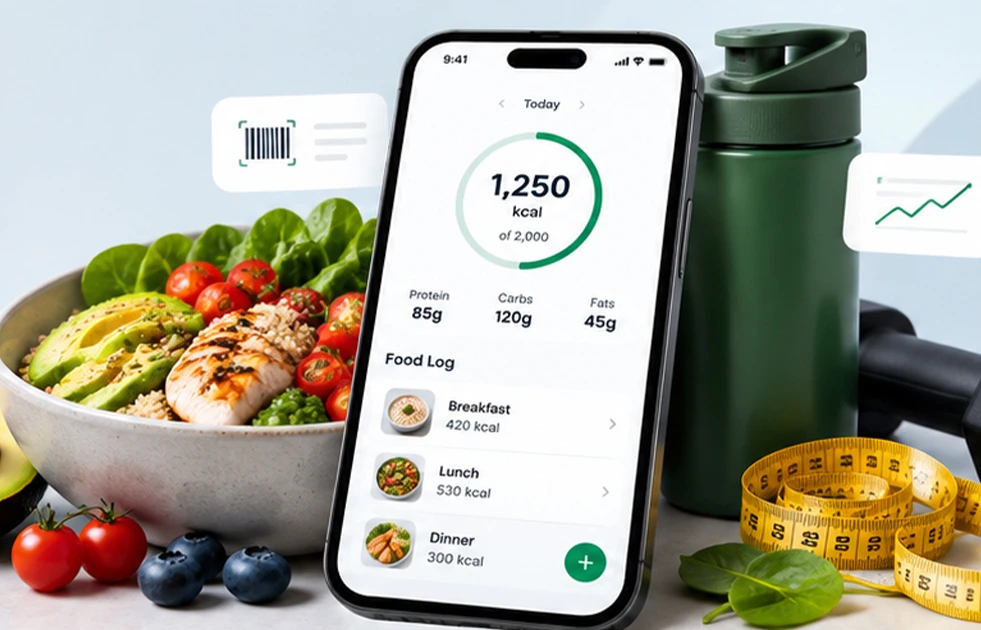
Most calorie trackers treat exercise as an afterthought. This app combines calorie and macro tracking with barcode scanning and AI-assisted meal logging alongside guided gym and home workout plans, step tracking, and heart rate and HRV trends in one place.
It's a newer app, so its community and third-party integrations are smaller than MyFitnessPal's, and it doesn't match Cronometer's micronutrient depth.
Pros: Nutrition and training in one app; personalized workout plans Cons: Smaller community; less micronutrient detail than Cronometer Choose it if: You want one app for what you eat and how you train, instead of juggling two.
6. Cal AI — Best for Photo-First Logging
Cal AI is built around one idea: take a photo, get an estimate. For people who quit tracking because typing every ingredient is tedious, that speed matters.
The trade-off is accuracy on mixed dishes, sauces and oils, which a camera can't see. (See the AI section below.)
Pros: Fastest logging experience Cons: Estimates on complex meals need manual correction; subscription required Choose it if: Speed is the only thing standing between you and tracking consistently.
7. FatSecret — Best Truly Free Option
FatSecret has stayed free for the core experience, including barcode scanning, food diary and a community. It's not flashy, but it doesn't push you to upgrade constantly.
Pros: Genuinely usable at $0 Cons: Dated design; fewer advanced analytics Choose it if: You want a no-cost tracker and don't need extras.
8. YAZIO — Best Budget Paid Plan with Fasting
YAZIO pairs calorie tracking with a built-in intermittent fasting timer and recipes. Its PRO plan is one of the cheaper annual subscriptions in this list.
Pros: Affordable PRO, fasting tools included Cons: Free tier is limited; database is stronger for European foods Choose it if: You follow intermittent fasting and want tracking and a timer in one app.
9. Noom — Best for Behavior Change
Noom is less a calorie counter and more a structured program built on behavior-change lessons and a color-based food system. Many people use it for the psychology side, not precision tracking.
Pros: Education and habit-building focus Cons: Expensive compared with pure trackers; less control over exact numbers Choose it if: Your problem is habits and mindset, not a lack of data.
AI Photo Logging vs. Manual Logging: Which Is More Accurate?
AI photo logging is faster, but it isn't automatically more accurate.
Research on image-based dietary assessment shows a consistent pattern: modern AI is good at identifying common foods, but portion size how many grams are on the plate is the weakest link. A 2D photo can't reliably show how deep a bowl of rice is, and it can't see the tablespoon of oil the chicken was cooked in.
Manual logging has its own problem: people are poor at eyeballing portions. "One cup of rice" can vary a lot depending on how it's packed.
Where each method wins:
| Situation | Better Method |
| Packaged foods | Barcode scan |
| Simple, separated plates (chicken, rice, vegetables) | Photo AI works reasonably well |
| Mixed dishes, curries, casseroles, smoothies | Manual entry or saved recipe |
| Anything cooked in oil or butter | Manual add the fat separately |
| Restaurant meals | Chain database entry if available, otherwise estimate and add a buffer |
To improve photo accuracy: separate foods on the plate, shoot from above with a fork or your hand in frame for scale, and always review the portion the app suggests before saving.
A reality check on "accuracy": Even the nutrition label isn't exact. US FDA rules allow some tolerance between the net calories listed on a package and what's actually inside. No app AI or manual gives you perfect numbers. What makes tracking work is consistency: using the same method and entries every day so your trend is reliable, even if individual numbers are slightly off.
How to Choose the Right Calorie Tracking App for Your Goal
Start with the problem you're trying to solve, not the app with the most downloads.
| If your main goal or problem is… | Start with | Why |
| I want accurate data and don't want to pay | Cronometer | Verified database, strong free tier |
| I eat out a lot and need to find any food | MyFitnessPal | Largest database |
| I've never tracked and feel overwhelmed | Lose It! | Simplest setup |
| I'm cutting or bulking and my progress stalled | MacroFactor | Targets adjust to your real weight trend |
| I want food tracking and workout plans together | MyFitnessCoach | Nutrition and training in one app |
| Logging takes too long, so I quit | Cal AI or any app with photo logging | Speed first then verify portions |
| I need $0, no upgrades | FatSecret | Free core features |
| I do intermittent fasting | YAZIO | Fasting timer built in |
| My issue is habits, not numbers | Noom | Behavior-change program |
Test Any App in Your 7-Day Trial
Instead of judging an app by its screenshots, use the trial week to check these five things:
- Search for three foods you eat every week. Do you get one clear entry or 20 conflicting ones?
- Scan two packaged items. Does the entry match the label?
- Log one full day and time it. If it takes much longer than 10–15 minutes, you're less likely to keep going.
- Log a homemade meal. Can you save it as a recipe to reuse?
- Find the paywall. Note exactly which features disappear when the trial ends.
If an app fails two or more of these, try the next one on your shortlist.
Common Calorie Tracking Mistakes That Skew Your Data
When the app says you're "on target" but the scale doesn't move, the issue is usually the data, not your metabolism.
| Problem | Likely Cause | What to Try |
| Weight isn't changing despite hitting your target | Untracked cooking oils, sauces, drinks, bites while cooking | Log fats and drinks separately; weigh food for 1–2 weeks to recalibrate your eye |
| Weekday deficit, but no weekly progress | Weekends aren't tracked or are much higher | Track all 7 days and look at the weekly average |
| Calorie count for the same food differs between days | Picking different crowdsourced entries | Save one verified entry as a favorite and reuse it |
| You eat back all exercise calories and stall | Workout burn estimates from apps and wearables can run high | Eat back a portion, or ignore exercise calories and follow your weight trend |
| Logging at night from memory | "Backlogging" misses snacks and portions | Log at or right after each meal |
| Target feels impossibly low or high | Formula-based estimate doesn't fit you | Follow it for 2–3 weeks, then adjust based on your actual weight trend |
| Barcode result doesn't match the package | Wrong or outdated database entry | Check the label and create a custom food |
The backlogging point is backed by research: in a 2026 study of a behavioral weight-loss program, participants who logged at least once or twice a day as they ate lost more weight than those who mostly caught up on their logs later (PubMed).
The Bottom Line
The best calorie tracking app is the one you'll actually use every day. Pick based on your biggest obstacle: accuracy (Cronometer), food coverage (MyFitnessPal), simplicity (Lose It!), adaptive targets (MacroFactor) or logging speed (photo-first apps).
Use your trial week to test real foods you eat, log consistently at mealtimes, and judge progress by your weekly weight trend not by any single day's number.
If you want your nutrition tracking and your workout plan in the same place, MyFitnessCoach is worth adding to your shortlist.
Frequently Asked Questions
Similar Articles
Stay informed with these similar articles.

MyFitnessCoach
February 25, 2025
Bent Leg Raise: A Simple Yet Effective Core Exercise
When it comes to building a strong core, there are countless exercises to choose from. However, not all exercises are created equal, and some are more effective than others. One such exercise that often flies under the radar is the Bent Leg Raise. This simple yet powerful movement can help you strengthen your core, improve your posture, and even enhance your overall fitness. In this article, we’ll dive deep into what the bent leg raise is, how to perform it correctly, its benefits, and how you can incorporate it into your fitness routine using the MyFitnessCoach app.
MyFitnessCoach
October 12, 2023
The Powerhouse of Energy: Creatine Food Sources
When it comes to fitness and energy, creatine is a name that frequently comes into the minds of fitness lovers. It's not just for bodybuilders or professional athletes; creatine is a naturally occurring compound that plays a vital role in providing energy for our muscles. In this article, we'll explore creatine's importance, how it works, and, most importantly, where you can find creatine in your everyday diet. So let’s dive right in:
MyFitnessCoach
March 5, 2025
What Are Net Calories? Simple Definition, Formula and MFP Explained
Net calories are the calories left after subtracting the calories you burn through exercise from the total calories you eat.